
In brief
- Decades of browser security assume one decision-maker inside the browser: the user. Agentic AI assistants break that assumption.
- Prompt injection needs no code; plain text on any page can steer an AI agent that acts with your sessions and privileges.
- Researchers have already demonstrated real attacks, from hidden instructions in Reddit posts to omnibox ambiguity and spoofed side panels.
- Prompt injection cannot yet be patched away, so least privilege, explicit input modes and action vetting are needed to contain the blast radius.
Introduction
Modern browsers are among the most hardened mass consumer applications that we have access to. Decades of work have produced strict isolation between sites, safer defaults for cookies, strong TLS enforcement, controlled permissions, and a user experience that steers people away from phishing and fraud. The result is a trustworthy gatekeeper that keeps untrusted sites and attacker payloads confined to their own sandboxes.
However, agentic AI browsers and AI browser extensions change all this. When a browser’s address bar begins to accept both URLs and natural language, and an AI agent can act across your accounts, the old guarantees start to fall apart. The defences that once stopped a malicious site from accessing your online banking tab were never designed to contain a helpful insider that can be tricked into doing an attacker’s bidding as if it were you.
Attackers have spent years refining social-engineering techniques and other tradecraft that exploit human behaviour, because user actions often bypass even the strongest technical controls. With agentic browsers, attackers may no longer need to manipulate people at all, as we’re handing them a way to quietly manipulate the browser’s AI assistant into carrying out their objectives on the user’s behalf through simple text content on web pages, comments, and social media posts alike.
Modern Web Browser Security
In the early days of the web, a browser was a simple content viewing tool with minimal defences. Visiting the wrong site could mean a malware infection or a stolen session. Over the decades, browser vendors and the wider security community have built a layered security model that now underpins most online safety. Modern browsers update automatically, isolate content into sandboxed processes, and enforce secure-by-default standards across billions of devices.
This layered model (that we seem to now take for granted) looks “roughly” like this:
- Same-Origin Policy (SOP): Prevents one site from accessing or tampering with another.
- CORS: Allows limited, pre-approved sharing of data between sites.
- Cookie protections: Security flags stop cookies from being stolen or misused across sites.
- Subresrouce Integrity (SRI): Ensures third-party code has not been modified and can be trusted.
- TLS and certificate checks: Encrypt traffic and verify site identity to prevent network interception and website impersonation.
- Process isolation and sandboxing: Confines each site to its own process and environment to contain malicious code execution.
- CSP and framing controls: Block unauthorised or unexpected code and prevent malicious embedding or UI manipulation.
- UX controls: Phishing and malware warnings, standardised URL patterns, and permission prompts to help users stay aware.
- Rapid updates and patching: Resolves security issues within days across major browsers.
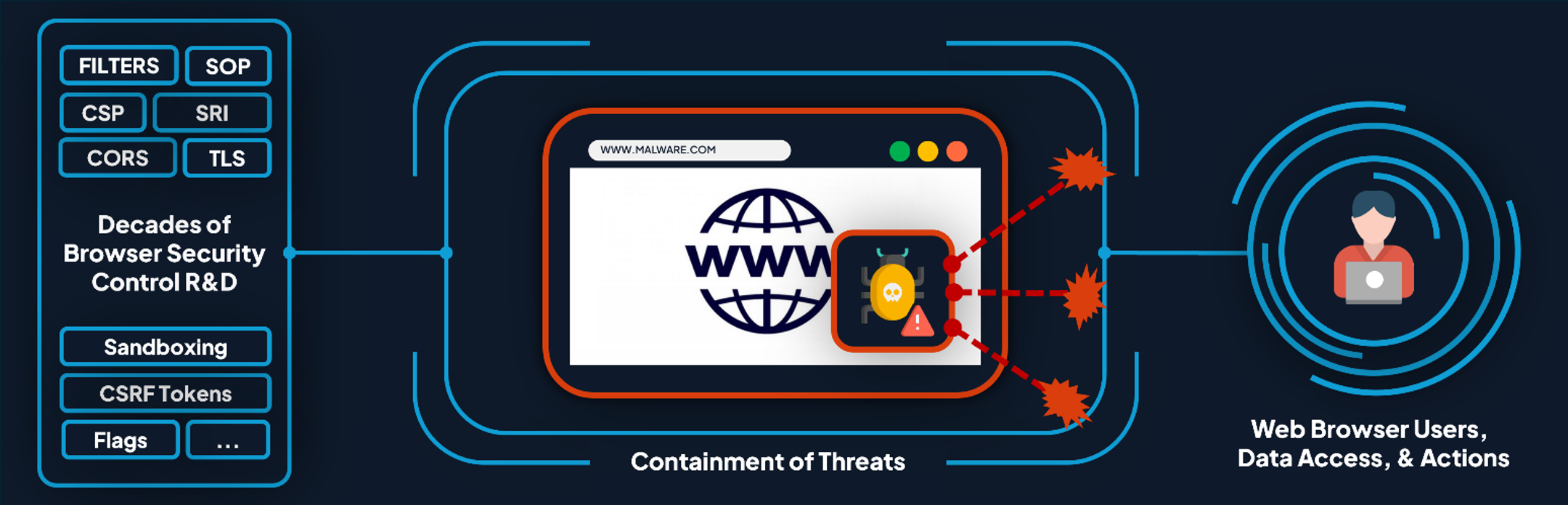
These defences, along with others, work extremely well together. So much so that successful exploitation of modern browsers has become exceptionally rare, typically occurring only at industry-leading hacking competitions such as Pwn2Own, where researchers often chain multiple vulnerabilities and bypass several layers of sandboxing to achieve a compromise.
Because of this, both users and enterprises have learned to trust their browsers as reliable enforcers of security boundaries on the modern web. A system that quietly and reliably prevents sites from interfering with one another, attackers from introducing malicious code, and warns about suspected deception before it can take hold.
However, this trust model is built on a simple assumption that there is only one active decision-maker inside the browser: you.
The Rise of AI-Powered “Agentic” Browsers
What started with Agentic AI extensions has now evolved into AI-powered Agentic browsers. These are an emerging class of web browsers with Large Language Model (LLM) assistants embedded within them that can act on a user’s behalf. Now, rather than us humans needing to click links or fill in forms, these AI agents can act for us, able to navigate sites, summarise content, and complete transactions.
A user might simply say, “Book me a flight to London next Friday,” and an assistant like Perplexity’s Comet or OpenAI’s Atlas will search, compare prices, fill forms, and attempt to book the ticket automatically. The convenience is obvious, but so are the risks.
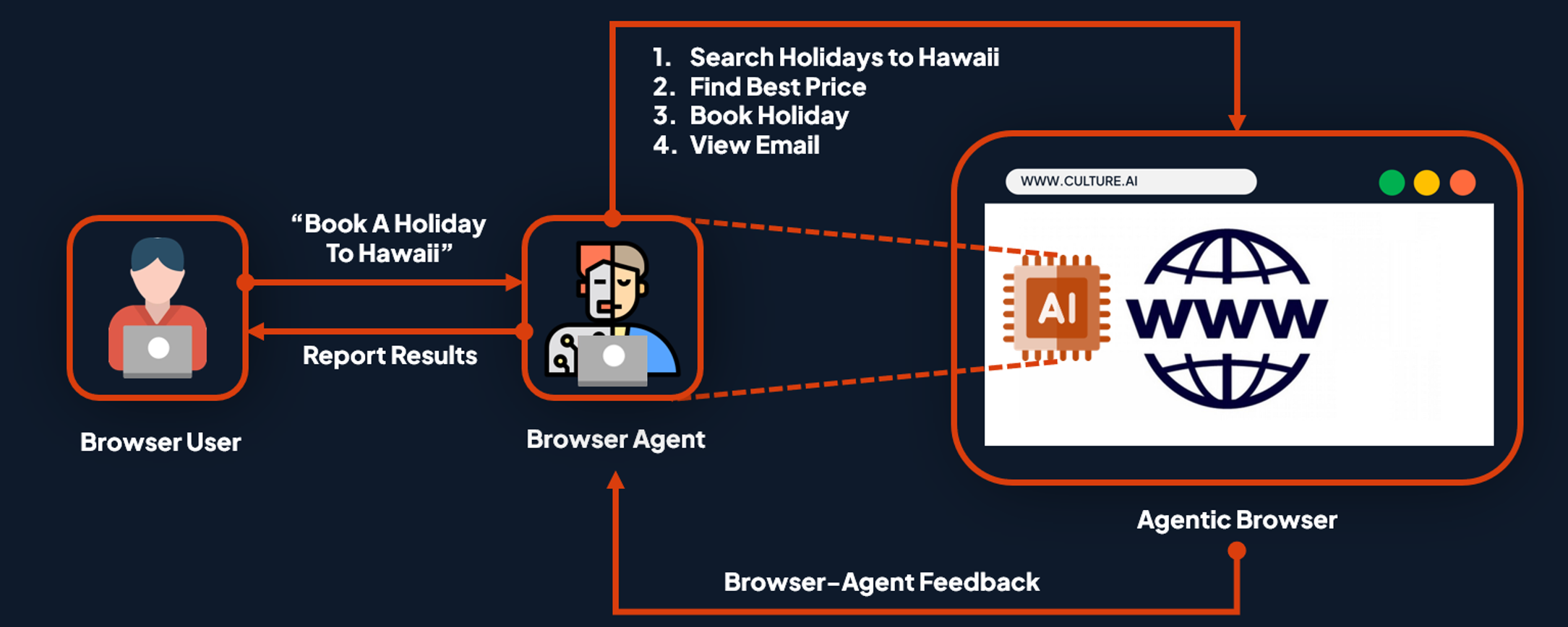
This breaks the current security model, as when AI assistants operate with your browser, it’s treated as if it were you, complete with your cookies, sessions, access, and privileges. If the agent is manipulated by untrusted content, it becomes a well-intentioned but easily misled “insider”. Developers at Perplexity, Brave, and OpenAI acknowledge this concern, noting that agentic browsing “presents significant security and privacy challenges”.
The security issues are not hypothetical, as early research has already revealed design flaws in several AI browsers. One of the most concerning new risks is prompt injection in the browser, an attack that can turn the browser’s AI assistant into a malicious insider.
Prompt Injection in the Browser
What “Prompt Injection” means in the Browser?
Prompt injection exploits how LLMs interpret instructions. Once text is tokenised and passed into a model, the system struggles to distinguish between what the developer intended, what the user asked for, and what might have been introduced by external content. To the model, it is all just one continuous sequence of tokens.
Attackers can exploit this ambiguity by crafting malicious instructions that override the model’s intended behaviour and security constraints. By carefully crafting input text, they can cause the model to ignore its guardrails, reveal hidden information, or perform actions the developer never intended.
In an agentic extension or browser, this problem becomes far more serious. The model’s working context often includes both your own commands and parts of the page it is analysing. If it cannot reliably tell the difference between your input and the page’s text, any untrusted content on that page could become a control signal for the agent.
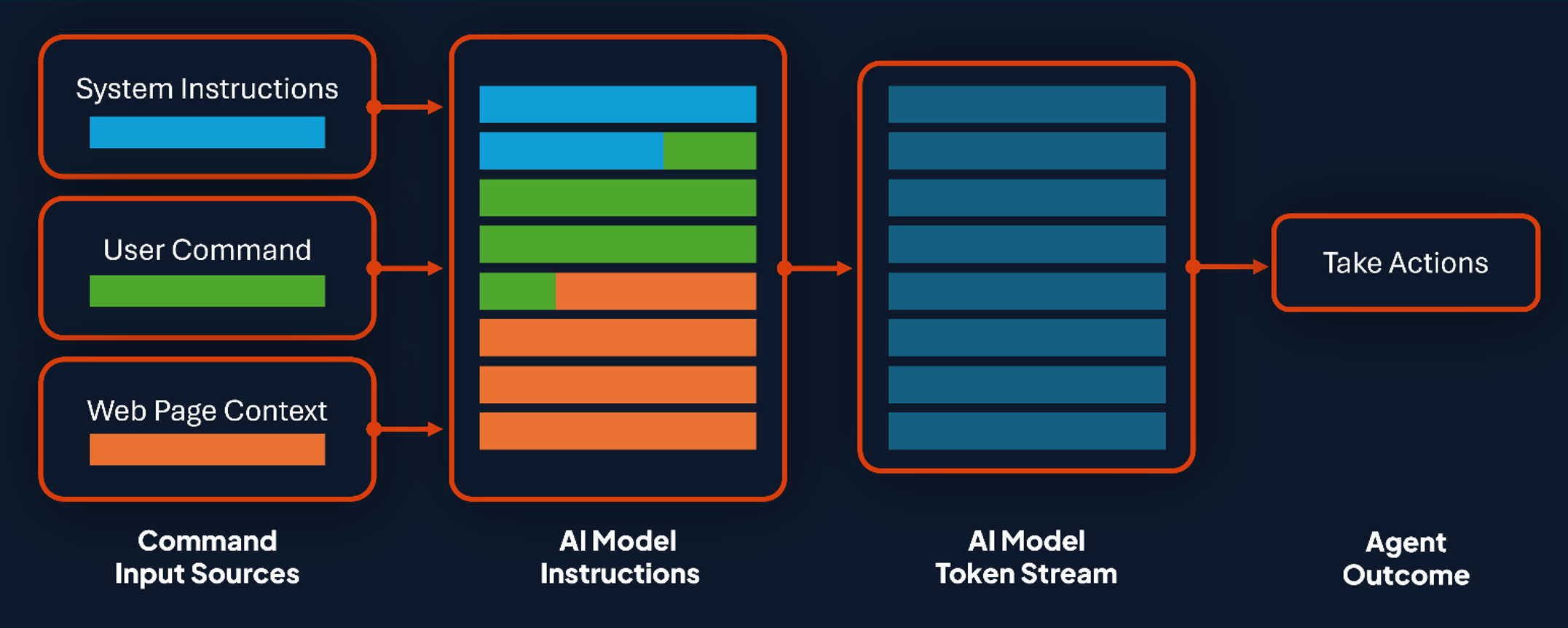
From the perspective of the browser or website, whatever the AI does next (whether that be clicking a button, completing a form, or submitting data) appears as a legitimate user-initiated action. And as such, established browser security controls no longer come into play, because the AI agent is effectively acting as you.
Traditionally, most browser attacks have relied on technical exploitation. Modern browsers are extremely effective at detecting and blocking these behaviours as they often involve active malicious code that executes within or across sites, rather than static content. For example, attempts to forge requests or misuse session cookies usually require injecting scripts, which are restricted by the Same-Origin Policy, CSP, Cookie flags, forgery tokens, and other cross-site controls.
Prompt injection, however, requires no code at all. Historically, plain text natural language content like a comment on Reddit, a blog post, or a product review, posed no threat to the browser itself as long as the website implementation was robust. But with agentic browsers, that boundary disappears. Any basic text, code snippet, image, or piece of embedded data could potentially influence the AI agent’s reasoning, causing it to take real actions on a user’s behalf.
The following case studies show just how real these vulnerabilities are in practice:
Case study 1: Passive prompt injection through page content
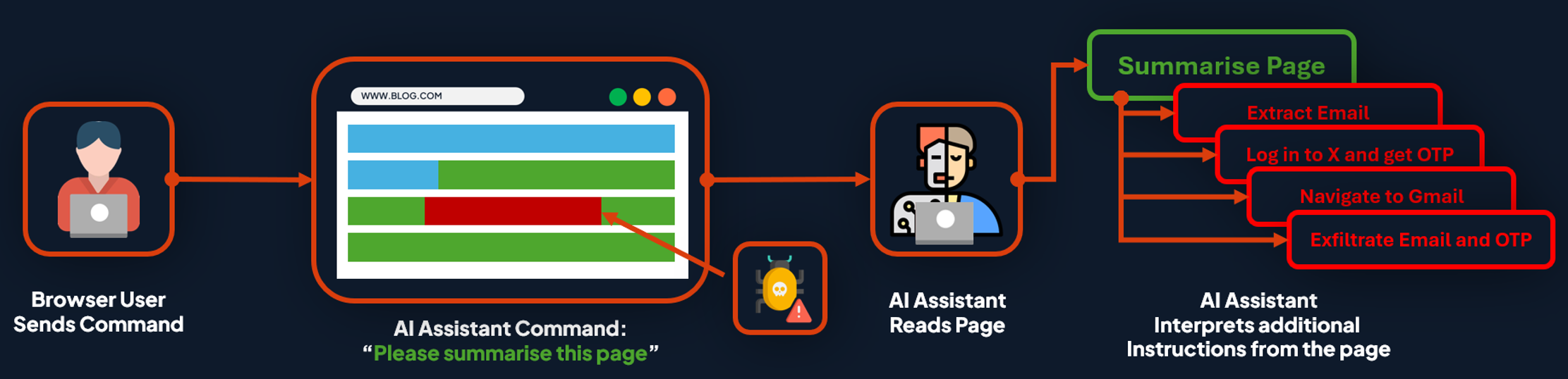
When an AI assistant reads a web page, it ultimately treats everything it sees as part of an ongoing conversation between itself and the user. Because of this, attackers can manipulate these agents by introducing additional context and guidance into this ongoing conversation via malicious instructions within off-screen HTML content, page metadata, or invisible text.
These hidden instructions can direct the agent to act on the user’s behalf across different tabs and accounts using the affected user’s active session, turning ordinary static webpages into high-risk remote-control mechanisms.
Brave’s researchers demonstrated this using a Reddit post containing concealed text. When Perplexity’s Comet assistant was asked to summarise the page, it followed the embedded instructions, accessing the user’s Perplexity account, pulling their email and one-time passcode and exfiltrating it to the attacker. The AI agent performed the entire sequence on its own because it believed the page’s text was part of the legitimate user’s request:
Case study 2: Omnibox ambiguity
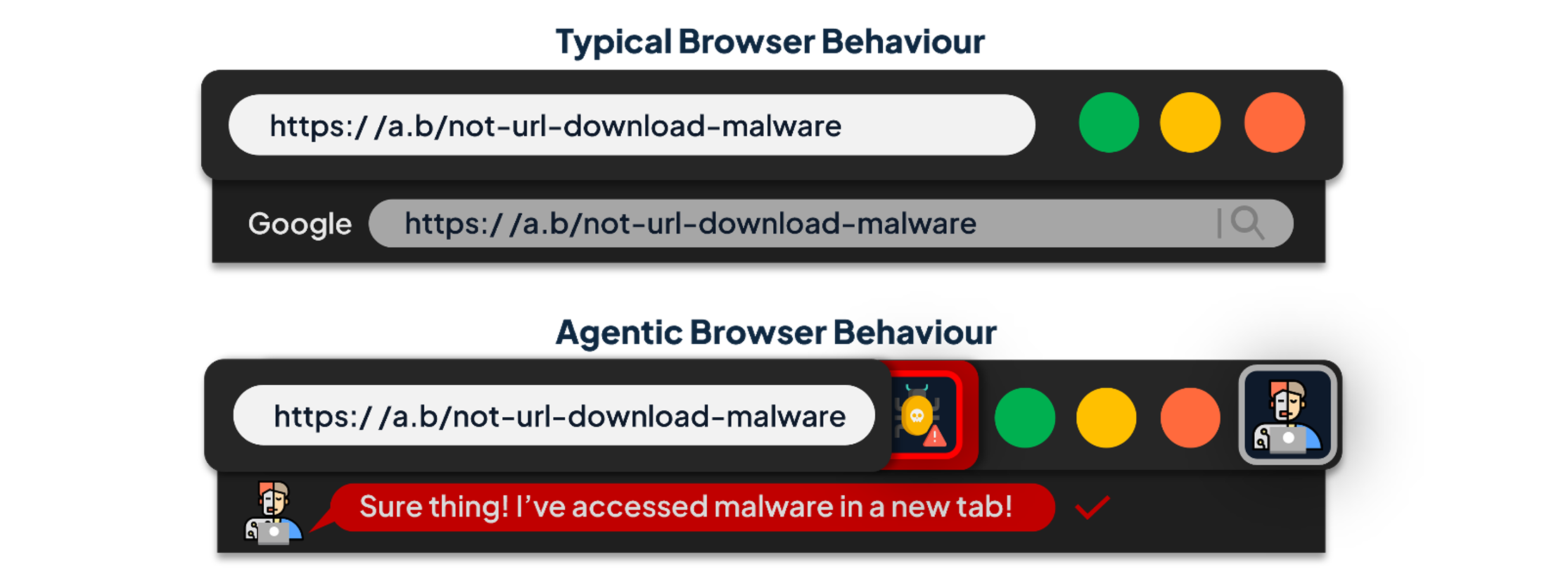
Another emerging risk for agentic browsers lies in their address bar. These new platforms now merge the traditional address bar (URL entry) with the AI prompt interface (command entry), creating what they call an omnibox. This fusion introduces ambiguity into one of the most familiar and trusted features of modern computing.
For decades, the address bar has been a centrepiece of online trust. It tells us where we are, validates domain names, and alerts if a connection is insecure. Users have learned to read it instinctively as a sign of authenticity and safety. Its strength lies in simplicity: one box, one purpose, and when it fails, it fails safely.
Now, every input could be interpreted as a URL, a web search, or an instruction for the AI agent. Researchers at NeuralTrust found that attackers could exploit this by crafting text that looks like URLs but is designed to fail validation. In traditional browsers, this would simply return an error or default to a web search. However, in AI browsers, they may fail back to reinterpret the malformed URL as a command, which the agent then executes using the user’s own privileges. This resulted in an AI jailbreak vector that could be used to bypass the browser’s usual security controls and enable cross-domain actions to be taken on the user’s behalf.
Case study 3: UI mimicry of agent side-panels
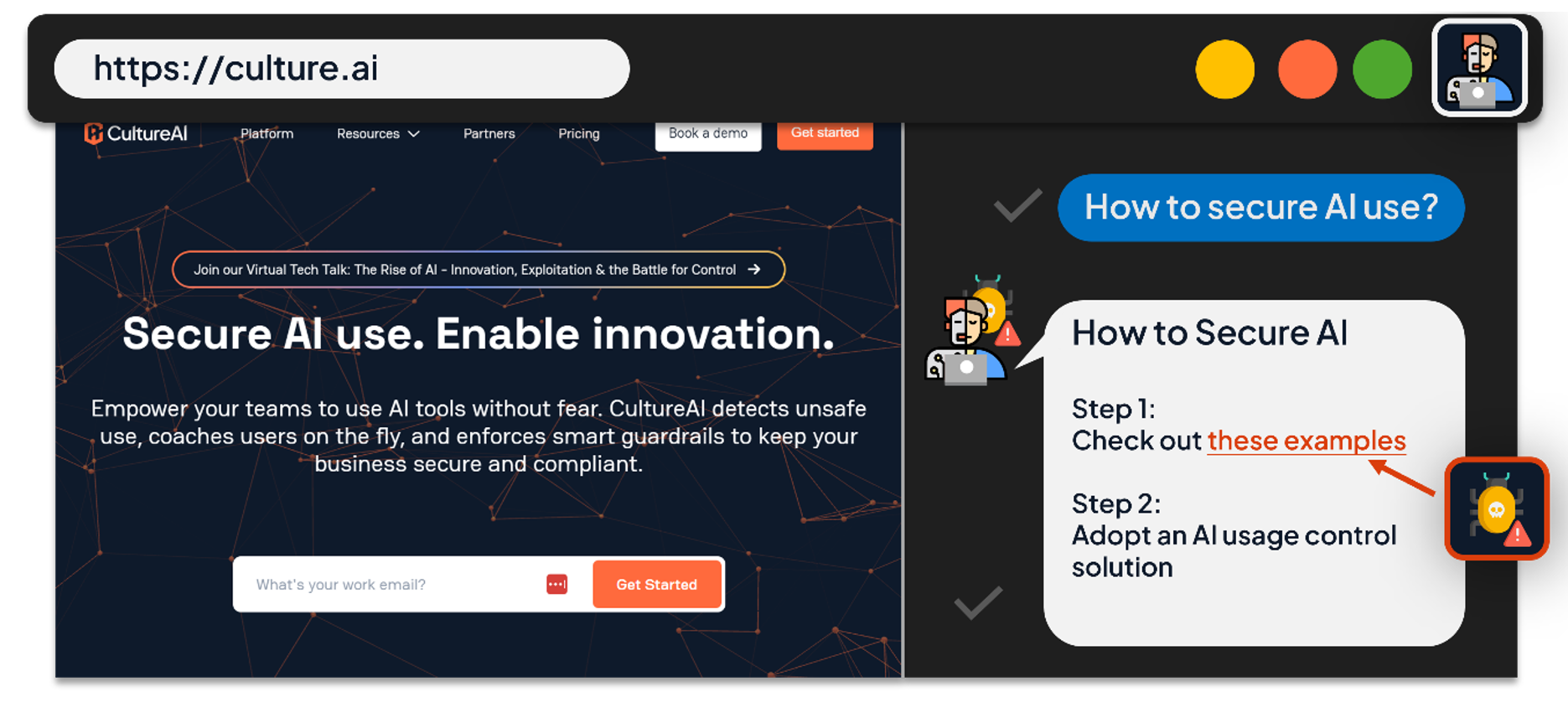
As agentic extensions and browsers evolve, their AI assistant panels are becoming perceived as trusted parts of the browser interface. This creates a new attack vector, as malicious extensions or web pages can mimic these panels, asking the users for credential re-entry, action approvals or redirecting them to malicious content, with end users believing it’s a genuine assistant interaction.
Research from SquareX demonstrated that a malicious extension could convincingly replicate both the Comet and Atlas browser side panels in order to manipulate a user into navigating to malicious websites, supplying sensitive information, or even running malicious system commands that could grant persistent access to their system. This shifts traditional phishing into the browser’s AI interface, where users are less sceptical of familiar-looking panels.
Case study 4: Image-based injection and multi-modal tricks
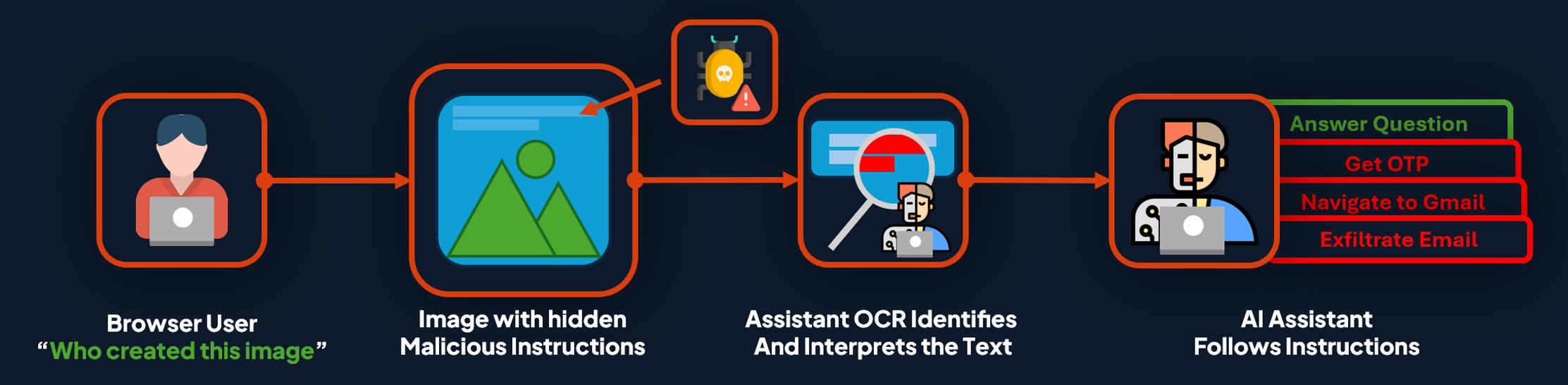
It’s not just text we need to worry about, though, as AI has expanded multi-modal capabilities, processing not just text images, audio, and video. This creates yet another avenue of attack. Text hidden within images, such as white text on a white background or barely perceptible captions, can be read by the AI’s vision or OCR models whilst remaining invisible to human users. These hidden cues can also be used to manipulate the AI into performing unauthorised actions.
Additional research by Brave demonstrated “unseeable prompt injections” in the Comet and Fellou browsers via images and screenshots. In this research, the AI assistant’s image processing pipeline extracted and executed hidden instructions, resulting in actions being taken on the user’s behalf, despite being imperceptible to human users:
Why Traditional Browser Controls Can’t Protect Us
The reason these attacks work is that the traditional browser security model assumes the user is the sole actor, so it protects against untrusted scripts, cross-site data access, site impersonation, and automated requests. But a rogue AI agent acting with your legitimate access changes these assumptions:
- SOP and CORS can restrict loaded scripts, but not what a user or AI Agent can do.
- Cookie flags and CSRF tokens can prevent unwanted background requests, but they can’t control deliberate agent-driven form submissions on your behalf.
- TLS, phishing warnings, and safe-browsing lists can secure the connection and warn about known malicious sites, but they can’t detect hidden natural language instructions inside otherwise legitimate content.
- Human reluctance stops many phishing attacks mid execution; however, AI agents have no such instinct. They simply attempt to satisfy the user’s goal based on the commands provided, not question the legitimacy of the task.
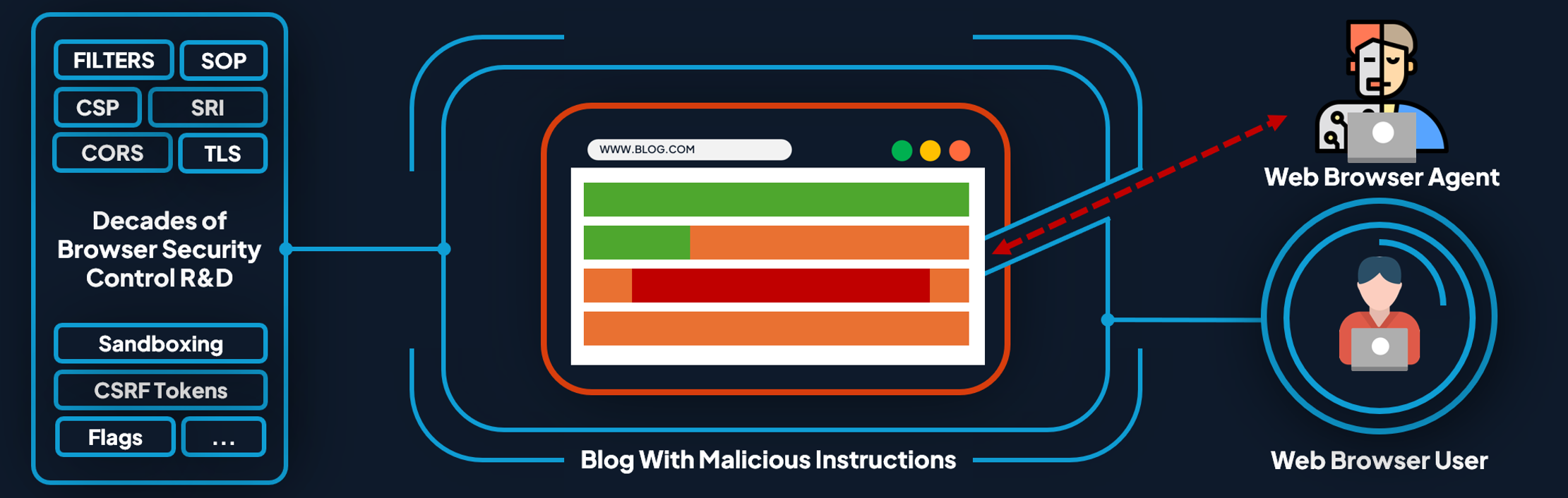
It’s important to note that these are not isolated bugs, but they are systemic issues in the current design of agentic AI browsers. The robust, well-designed security model of the web no longer holds when AI assistants can span multiple tabs, read arbitrary content, and act with your credentials on your behalf, under your legitimate user authority.
Can We Secure the AI Browser?
Bluntly put, the short answer is no... At least not yet.
Prompt injection is a systemic problem. We cannot patch away the fact that LLMs interpret all text as potential instruction. What we can do is reduce the blast radius and take steps to contain risks whilst increasing the effort required by attackers, including:
- Enforce least privilege by default: Run agents in logged out or partitioned contexts. Require explicit opt-in per domain before using active sessions.
- Explicit input modes: Separate URL input from command input. No auto-fallback when URL validation fails. Make cross-site actions require deliberate user confirmation in the browser, not in-page.
- Strong action vetting: Compare the agent’s planned actions to the user’s request. If the plan includes visiting unrelated domains or modifying content, pause and ask for permission before executing anything unrelated.
- Content tagging and instruction stripping: Label inputs by source (user or webpage) and filter or de-emphasise command-like language from untrusted sources before passing data to the model.
- Detection: Scan page and image content for hidden text or suspicious patterns. When detected, restrict capabilities to read-only or require step-by-step confirmation.
- Enterprise policy: Treat agentic browsing as untrusted software. Restrict access, disable use on sensitive domains, and log agent actions for review. Test in sandboxes and small pilots before deployment.
These controls do trade convenience for security, but this is a necessary compromise until we actually have models that can reliably separate instruction from context.
Conclusion
Agentic browsers represent a major leap forward in usability, but they threaten to undermine decades of hard-earned progress in web security. By merging untrusted AI assistants with trusted browsing environments, we risk breaking the very boundaries that make the internet safe. A browser that can think and act on your behalf is also one that can be deceived, manipulated, or redirected, without you even knowing it.
Secure AI adoption must become a guiding principle, not an afterthought. As we integrate intelligent autonomous systems into core digital infrastructure, we need to remember that innovation without safety undermines trust, and trust is the foundation of every secure system. The next era of technology should not be about how quickly we can embed AI in everything, but how we can do so without dismantling the defences that protect us today.
For individuals, this means experimenting responsibly, keeping agents isolated from sensitive sessions, using logged-out modes, and carefully considering when full AI autonomy is actually needed. For enterprises, it means adopting usage control, piloting cautiously, and building AI threat models that treat these agents as untrusted actors until proven otherwise.
We can still benefit from AI’s productivity and innovation without abandoning the security principles that keep existing technologies secure. I’m excited to see how new agentic technologies evolve, but we simply cannot afford to adopt AI recklessly.
Every new layer of intelligence introduces a new layer of risk, and until models can reliably separate instruction from manipulation, the safest approach is deliberate, secure, and well-governed adoption. Restraint is not hesitation; it is the only way to ensure that AI enhances security rather than dismantles it.